

Run your own server
A multi-user Curio runs as one Docker container behind a reverse proxy that serves it over HTTPS. Started with --deploy, it has accounts and per-user projects, and it runs each node's Python in a confined process. This page helps you decide and plan; the deployment guide has every step.
How a deployment fits together
You need a Linux server with Docker and Docker Compose, a hostname that points to it, and a reverse proxy. The guide uses Caddy, with a certificate from Let's Encrypt or from your institution. The container publishes the backend API on port 5002 and the web app on port 8080; the sandbox that runs node code listens only inside the container.
Curio can live under a path such as /curio/ and share the hostname with other sites. The proxy sends /curio/api/ to the backend and the rest of /curio/ to the web app, removing the prefix:
curio.example.org {
    handle_path /curio/api/* { reverse_proxy localhost:5002 }
    handle_path /curio/* { reverse_proxy localhost:8080 }
    redir /curio /curio/ 301
}
Sign-in and isolation
Always start with the docker-compose.deploy.yml overlay. docker-compose.yml alone runs Curio as a local tool with no login, so anyone who can reach the address gets in. The overlay adds --deploy, which turns on accounts and projects. It also seeds the example projects, turns off publishing to the shared Node Catalog, and restarts the container after a reboot. Your own docker-compose.site.yml adds this site's flags (see Configuration).
export COMPOSE_FILE=docker-compose.yml:docker-compose.deploy.yml:docker-compose.site.yml
docker compose build
docker compose up -d
docker compose logs curio | grep CURIO_NO_AUTH   # must print CURIO_NO_AUTH=0
Visitors sign up with a username and password, or continue as a guest unless the backend runs with CURIO_ENV=prod. All guests share one account and cannot install libraries. Each node's Python runs in a short-lived child process under an unprivileged account, with memory and CPU capped, no network, and no access to the user database or other users' stored data. A --deploy that cannot set this up refuses to start. The Docker image has what it needs, and the app's version badge shows whether node code is isolated. Every user's nodes run under that one account and can run any Python within those limits, so give accounts to people you would trust with code on the server.
Configuration
A deployment's settings live in docker-compose.site.yml, next to the compose files. Its command lists curio.py start flags:
services:
  curio:
    command: ["--backend-url", "https://curio.example.org/curio/api", "--base-path", "/curio"]
--backend-url is the address browsers reach the backend at, and --base-path the path the app is served under; both match the proxy above. A second stack on the same server also sets ports: !override ["5012:5002", "8090:8080"] there, for host ports of its own. Other flags go in the same list, such as --exec-memory-mb, --exec-timeout and --exec-parallelism for node limits, or --llm-provider, --llm-base-url and --llm-model for a default AI provider (see AI agents). The backend reads SECRET_KEY, which every deployment should set, and the default AI key CURIO_DEFAULT_LLM_API_KEY from its environment or from utk_curio/backend/.env.
Updating and backups
With COMPOSE_FILE exported as above, pull, rebuild without the build cache, recreate the container, and hard-refresh the browser. Database migrations run when the container starts.
git pull
docker compose build --no-cache
docker compose up -d --force-recreate
Back up instance/ (the database of users, projects and sessions), datasets/ (the shared Data Catalog) and .curio/ (each user's projects, datasets, packages and outputs). Node packages, Discovery Catalog sources and shipped models ship inside the image. At every start, isolation restricts instance/, datasets/ and parts of .curio/ to their owner, so a backup job must run as root or as that owner.
The monitor page
Every instance serves /monitor: the version and isolation mode, hardware load, node runs and failures, account and content totals, disk use, and the latest errors. Figures count from the last restart. Copy diagnostics copies it all as Markdown for an issue, and Download saves it as JSON.
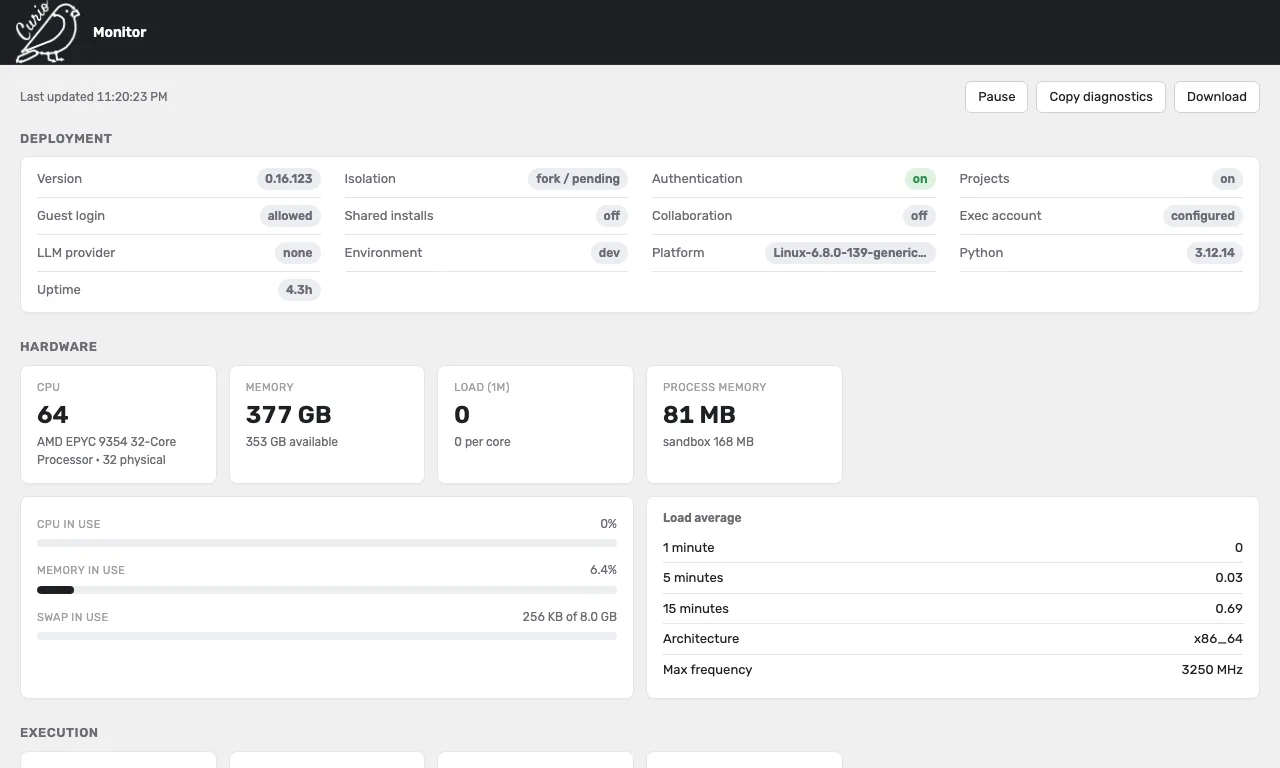
The page is public, with no sign-in. Its statistics are aggregates with no usernames or addresses, but its error log shows raw tracebacks, including server paths and fragments of other users' node code. To hide them, block the monitor routes at the proxy; the deployment guide shows how.