

Projects and files
Every dataflow you save is a project, listed on the projects page. There you open, rename, copy and delete projects and import Jupyter notebooks, while the canvas's File menu saves a dataflow to a file on your computer and loads one back.
The projects page
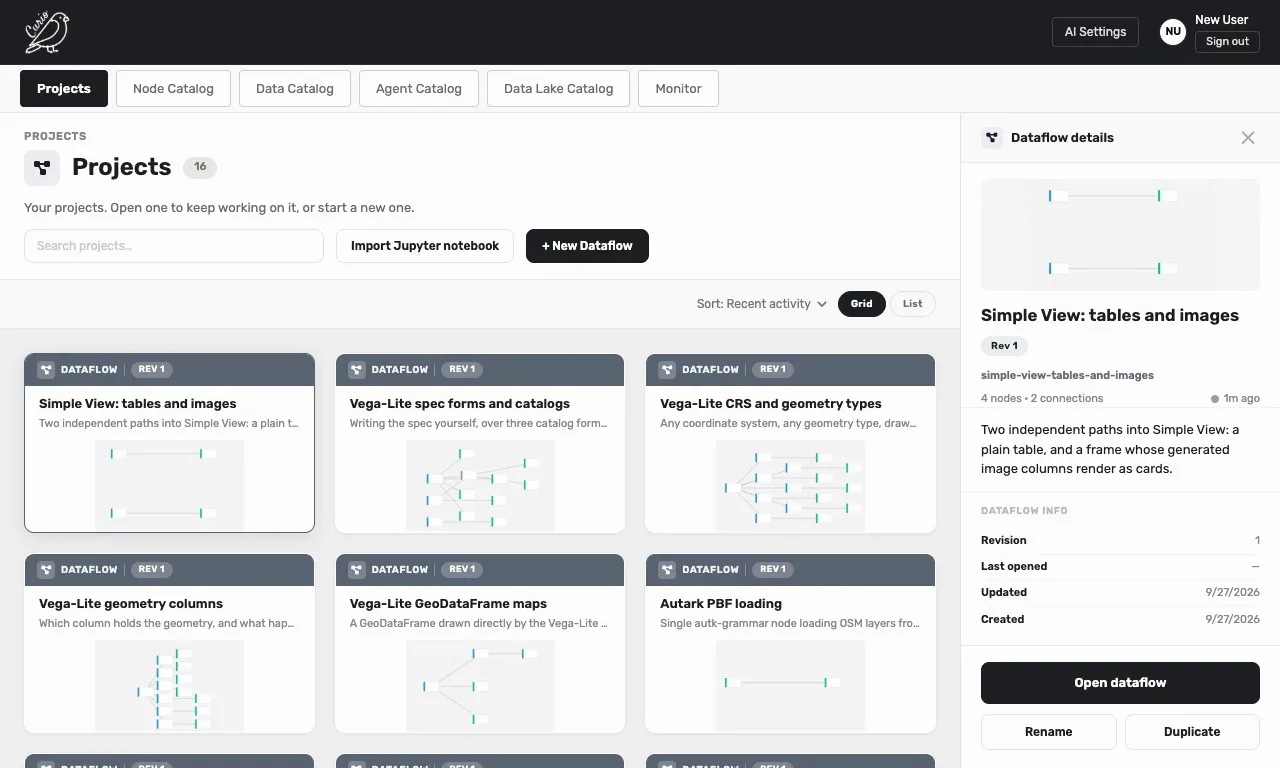
+ New Dataflow opens an empty canvas, which becomes a project the first time you save it. The Search projects… box filters the list by name, the sort menu orders it by recent activity, name or creation date, and Grid and List switch the layout. Each card shows a thumbnail of the dataflow and a revision number that goes up with every save.
Double-click a card to open it, or click it once to see its details, with Open dataflow, Rename, Duplicate and Delete; right-clicking a card offers the same actions. Duplicate adds a copy with "(copy)" after its name, and Delete asks you to confirm, then deletes the project permanently. From the canvas, File > Go to projects or the Curio logo brings you back here.
Saving needs an account: on a server with sign-in, a guest can open dataflows but not save them.
The examples
Every account on the hosted Curio starts with its own copy of the example gallery, dataflows such as "Vega-Lite chained transforms" and "Autark PBF loading" that are ready to open and run. You can edit, rename and save them like any other project, but they cannot be deleted.
On your own computer, the examples come from starting Curio with --with-examples, which the Docker image does (see Install).
Saving to a file and loading one
File > Save dataflow as downloads the open dataflow as a .json file named after it. The file holds the nodes, their code and specifications, and the connections, but not their results or the version history, so its nodes need to run again once it is loaded.
File > Load dataflow reads such a file and puts its dataflow on the canvas in place of the open one. Loaded into a saved project, it replaces that project the next time the project saves, so to keep both, choose File > New dataflow first, then load the file and save. Curio installs the node packages the dataflow uses that you are missing; for a very large package, it puts an install button on the nodes that need it instead.
Jupyter notebooks
Import Jupyter notebook, on the projects page, turns an .ipynb file into a new project named after the file. Each code cell becomes a node, named after the variable it produces, and cells that use variables from other cells are connected to them. Cells that only import libraries are gathered into one "Setup / Imports" node, cells that read data become Data Loading nodes, and a cell that builds an Altair chart becomes a Vega-Lite node.
File > Export as notebook goes the other way and downloads the dataflow as an .ipynb file, with its nodes in run order. Python nodes become functions you can run in Jupyter, and Vega-Lite nodes display their chart. Autark, JavaScript, Spatial Join and Simple View nodes, and nodes from other packages, are kept as notes, because a Python kernel cannot run them.